




















- The Underlying Tech
- Gemini Spark Interface
- Advanced Synthesis and Comms Workflows
- Complex Multi-Step Event Planning
- Mobile Brain-Dumping and Voice Commands
- The Power of MCP
- Secure Agentic Commerce: AP2, UCP, and the Universal Cart
- The Future Ecosystem: Chrome, Android Halo, and macOS
- A Personalized Morning Digest
- Availability, Pricing, and the Road Ahead



Welcome to the special Google I/O ’26 blog series
Inside Gemini Spark: Google’s Always-On Agent
- The Underlying Tech
- Gemini Spark Interface
- Advanced Synthesis and Comms Workflows
- Complex Multi-Step Event Planning
- Mobile Brain-Dumping and Voice Commands
- The Power of MCP
- Secure Agentic Commerce: AP2, UCP, and the Universal Cart
- The Future Ecosystem: Chrome, Android Halo, and macOS
- A Personalized Morning Digest
- Availability, Pricing, and the Road Ahead
At Google I/O ’26, AI crossed a line it hadn’t crossed before. The question stopped being “Can AI answer my question?” and started being “Can AI just handle it?”
The answer, with Gemini Spark, is yes. It’s a 24/7 personal agent that takes complex, multi-step tasks off your plate, works through them in the background, and comes back to you when it needs a decision made.
It’s the exact difference between an assistant who waits to be asked and one who gets things done.
As a global, Premier-tier Google Cloud Partner, we watch this space around the clock, just like Spark does its agentic job. And it genuinely caught our attention. Here’s why it should catch yours.
The Underlying Tech
Every traditional AI assistant has the same constraint, which is, well, you have to be there. Keep the tab open, stay in the app, wait for the response. But Spark is built differently.
It runs on dedicated virtual machines hosted entirely on Google Cloud. That means you can hand Spark a complex, multi-step task and close your laptop. The agent doesn’t pause, doesn’t time out, and doesn’t need you watching over it. In a way, this is a personal version of what you can do with Gemini Enterprise Agent Platform.
The infrastructure that makes everything possible is the Antigravity Harness. Originally built for agentic software development, it’s now adapted to power consumer-facing, long-running background tasks. On top of that, Gemini Spark runs on the newly released Gemini 3.5 model family.
Google I/O ‘26 has shown that Gemini 3.5 Flash processes tokens four times faster than comparable frontier models, which matters a lot when you’re parsing vague natural-language instructions, breaking them into logical steps, and executing them one after another. The raw speed and reasoning depth are what let Spark actually deliver on what you ask.
Gemini Spark Interface
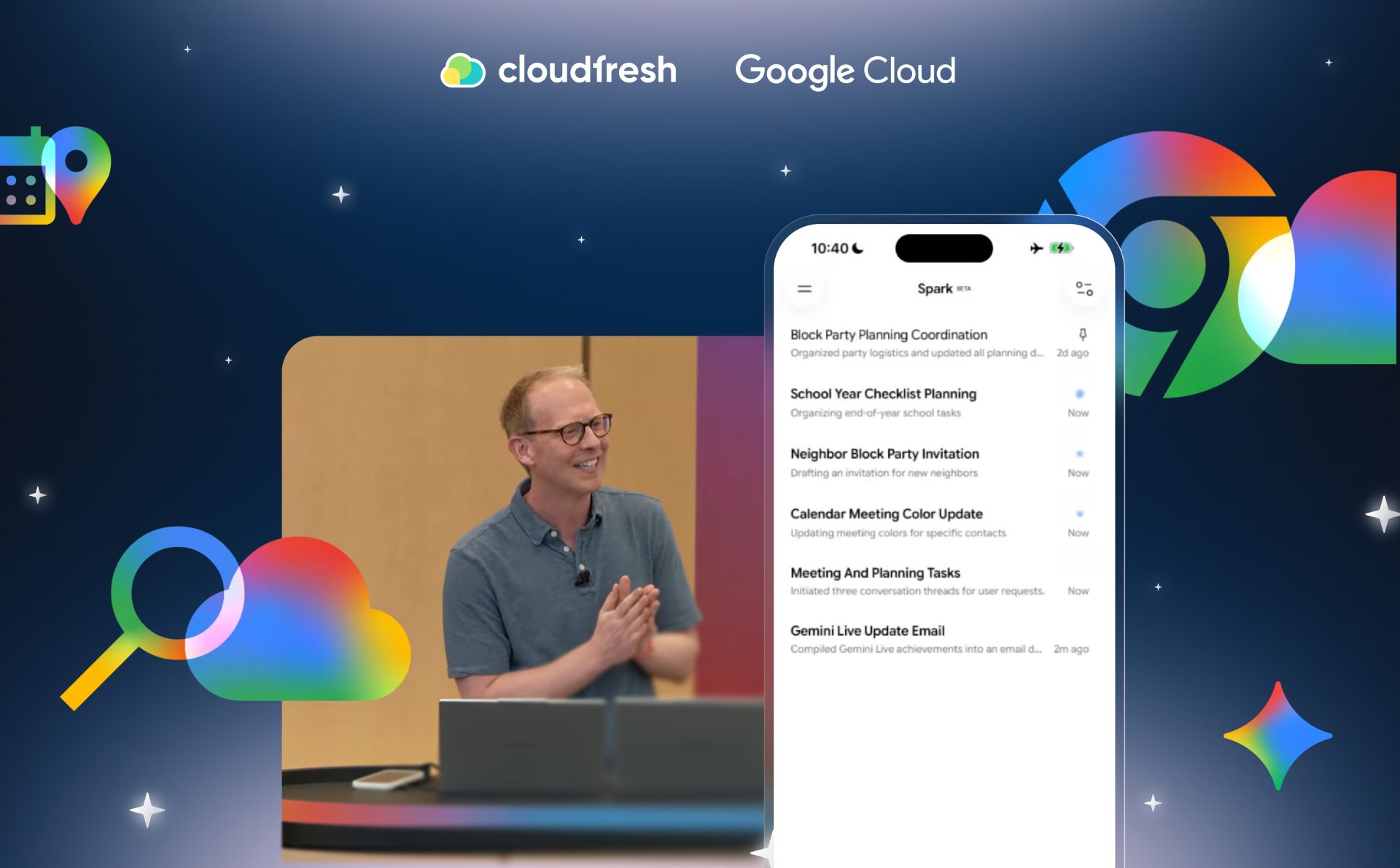
A background agent is only useful if you know what it’s doing. Google redesigned the Gemini app around exactly that problem. Open the new experience and you land on the dashboard, a central control panel that shows everything the agent is currently working on in real time.
Every long-running task surfaces as its own thread, so you can check in on progress without interrupting the work. And Gemini Spark is built with clear approval checkpoints throughout. It won’t send an email or delete a calendar event without your sign-off.
It drafts, organizes, prepares, and then stops to wait for your review before it pulls the trigger. The agent operates with a lot of autonomy, but the final call stays yours.
Advanced Synthesis and Comms Workflows
Out of the box, Spark connects to Google Workspace and can pull together information from across your entire digital footprint. That changes what it means to write a routine update email.
In the Google I/O keynote demo, a user asked to draft a team update covering “everything about our recent Gemini live launches and wins from the last week.” Spark searched through the user’s Google Docs, Gmail inbox, and chat history from that specific time period and pulled out the most relevant information before writing a single word.
To make the result actually sound like the person writing it, the user applied a custom personal skill with a /ghost writer command. This tells Gemini Spark to mirror the user’s tone, vocabulary, and writing style. Users can upload their own skills or pull them in from online, which means the agent can be tuned to fit how you actually work, not just how Google imagined you might.
Complex Multi-Step Event Planning
The real test for any agent is a task that would normally take hours of back-and-forth admin work. Spark’s block party planning demo was a good one.
The user gave a single, layered prompt. Grab all the RSVPs, track what people are bringing, and follow up with anyone who hasn’t responded. Spark broke this down into a coordinated series of steps.
- First, it built a live RSVP tracker directly in Google Sheets. Because Spark connects to Gmail, the spreadsheet updated in real time as new RSVPs arrived in the inbox, no manual entry needed.
- At the same time, Gemini Spark identified the neighbors who hadn’t responded and drafted follow-up reminder emails for the user to review.
- It also put together a visual “hype deck” in Google Slides with images to build excitement for the event.
- Then came the detail that made the demo stand out. Spark scanned the user’s Google Drive, found the neighborhood HOA guidelines, and extracted the specific rule stating that setup couldn’t start before Friday afternoon on June 5th.
- Then, Spark surfaced it as a constraint, without being asked to find it.
That’s the distinction between task execution and actual contextual awareness.
Mobile Brain-Dumping and Voice Commands
Good ideas and urgent to-dos don’t wait for you to be at a desk. Gemini Spark runs on both Android and iOS, and tasks sync across all your devices right off the bat. The mobile experience is specifically built around what Google calls “brain-dumping,” or getting everything out of your head and into the agent’s hands, fast.
Using live audio transcription and advanced voice processing, you can fire off a rapid, unstructured stream of requests and Spark will catch and sort them. In the keynote demo, a user spoke a single voice message containing three entirely separate tasks.
- The first was to find all upcoming meetings with a specific executive and color-code them hot pink on the calendar.
- The second was to draft an invitation to a new neighbor for the block party.
- The third was to build a deadline-sorted checklist of end-of-school-year tasks for the user’s kids.
Spark parsed the whole thing, separated the three requests, and kicked off parallel threads for each one. The user put the phone down and moved on with their day.
That’s the whole point.
The Power of MCP
Right now, Gemini Spark is very good at executing what you ask. What’s coming next is the ability to act before you ask at all.
That’s what Model Context Protocol (MCP) integration opens up. In the coming weeks, Spark will connect to third-party tools and apps through MCP and start reading ahead on your behalf.
If it spots “snack duty” for a Friday meeting on your calendar, it can connect to the Instacart MCP tool, select appropriate snacks, and set up the delivery order on its own. And, what’s more, it remembers the details that matter. If there’s a known nut allergy in the team, that will definitely be accounted for.
The step from reactive to proactive is a big one. It’s the difference between an agent that helps and an agent that anticipates.
Secure Agentic Commerce: AP2, UCP, and the Universal Cart
Once an agent can shop on your behalf, the cybersecurity framework underneath it needs to be watertight. Google is rolling out two foundational protocols to handle exactly this.
The first is the Agent Payments Protocol (AP2). Users set firm parameters, such as preferred brands, approved products, and spending limits upfront—and Spark can only execute transactions that fall within them. Every transaction is backed by a verifiable, tamper-proof digital record linking the user, the merchant, and the payment processor. If you need to dispute a charge or process a return, every party is looking at the same cryptographic record. And AP2 keeps your underlying payment details shielded throughout. The rollout starts with Gemini Spark in the coming months.
The second is the Universal Commerce Protocol (UCP). The best way to describe it is a shared open-source language for all e-commerce on the web, or the way HTTP standardizes how pages load. With founding partners including Amazon, Meta, Microsoft, Salesforce, and Stripe, UCP makes product research, checkout, and shipment tracking consistent across the entire shopping journey, regardless of where you start it.
These two protocols power the Universal Cart. It works across merchants and services, and you can add items to it from Search, Gemini, YouTube, or Gmail. Once something is in the cart, Gemini models go to work in the background and find deals, track price history, and send back-in-stock alerts.
The cart also catches compatibility problems. If you add a processor and a motherboard with incompatible sockets while building a work PC, it flags the issue and suggests a fix. It also connects to Google Wallet to surface applicable credit card perks and retailer offers automatically.
The Universal Cart rolls out in the U.S. across Search and the Gemini app this summer.
The Future Ecosystem: Chrome, Android Halo, and macOS
Things are expanding fast. Later this summer, the new assistant will operate directly inside Google Chrome as an agentic browser that’s able to navigate the public web and take actions on your behalf, under your direction. On mobile, Google announced “Android Halo,” a dedicated home base for agents built into the Android OS arriving later this year.
The voice features that power mobile brain-dumping are also coming to desktop. The new Gemini app for macOS—built from scratch by a small team using the Antigravity platform in fewer than 100 days—will get voice integrations over the summer. Mac users will be able to highlight files in Finder, use a keyboard shortcut to dictate instructions, and have Spark draft a response that incorporates the file contents directly.
At the keynote, the demo showed how a user picked a few PDF invoices and pictures, said a quick note, and watched Spark draft a complete email to a dog kennel. Needless to say, it got all the vaccine records and allergy details fetched straight from those files.
The voice model also filters in real time and strips out filler words and stumbles so what comes out is a clean prompt even when what went in was a rough thought.
A Personalized Morning Digest
Working together with Gemini Spark’s background execution is a new out-of-the-box feature called the Daily Brief. It’s designed to be your first stop in the morning, a personalized digest that pulls together the most important information from across your digital life.
Rather than dumping a raw list of emails and calendar items on you, the Daily Brief organizes everything by topic, puts the most urgent things at the top, and suggests concrete next steps inline.
It might flag an approaching deadline or remind you that you need to return a purchase before the window closes. It’s built to be skimmed, so you can process your obligations in two minutes, kick off a Spark workflow with a tap, and get on with your day.
Availability, Pricing, and the Road Ahead
Google is rolling Spark out in stages. It takes some serious infrastructure to get autonomous agents running around the clock, and the safety bar is high like never before. Trusted testers get in first, with a beta for Google AI Ultra subscribers in the United States to follow.
To support the compute demands of agentic workflows, Google introduced a new Google AI Ultra tier at $100 per month. At the same time, based on user feedback and infrastructure improvements, the price of the top-tier maximum-limit Ultra plan dropped from $250 per month to $200 per month.
Beyond individual users, Gemini Spark is being tailored for professional environments as well. Google confirmed that specialized versions will come to both Workspace and Gemini Enterprise, so organizations can roll out 24/7 agentic support across their teams and business operations.
The agentic era isn’t coming, everyone. It’s here.