






What Is Jamf and How Does It Work?
- Architecture & Scope

- Device Deployment & Onboarding
- App Distribution & OS Management
- Endpoint Security & Threat Response
- Auto-Compliance & Identity Access
- Apple MDM Pricing & Licensing
- How Do These MDM Solutions Compare?
- Who’s Leading the MDM Solutions Market?
- FAQ
Jamf 22.05.2026 


Apple MDM Solutions Compared: Jamf vs. Iru vs. Microsoft Intune
- Architecture & Scope
- Device Deployment & Onboarding
- App Distribution & OS Management
- Endpoint Security & Threat Response
- Auto-Compliance & Identity Access
- Apple MDM Pricing & Licensing
- How Do These MDM Solutions Compare?
- Who’s Leading the MDM Solutions Market?
- FAQ
Picking Jamf, Iru, or Microsoft Intune for your Apple fleet comes down to more than just a feature list.
They all handle devices, security, and connections differently. You feel those choices the second you try to push a major update or hand a MacBook or an iPhone to a new hire.
Here’s a straight breakdown of how they actually compare, so you can see where each one fits best.
Get Proactive Today Roll out MDM with an ISO 27001-certified Professional-tier Jamf Partner. Make sure that every endpoint is secured, your data stays safe and private, and nothing gets in the way of your compliance goals. Schedule a Security Audit →
Architecture & Scope
How an MDM solution is built sets the tone for everything else. How close a look can you get at a device? How fast can you react when Apple drops an update?
Jamf
Jamf is Apple, period. It runs purely on Apple’s native frameworks and endpoint security APIs across macOS, iOS, iPadOS, tvOS, watchOS, and visionOS.
The payoff? The second Apple releases a new OS, Jamf supports it. You never have to wait around to push updates or flip on new security features. If you run an Apple-first shop, this direct line is hard to beat.
Iru
Iru started in that same Apple-only space back when it was known as Kandji, but it has since opened up to handle Windows and Android.
On the device itself, things stay light. One agent drops in during setup and handles its own updates automatically. Behind the scenes, the Iru Context Model and Iru AI link user identity, device behavior, and compliance together.
Microsoft Intune
Microsoft Intune plays a completely different game. It sits inside the Microsoft 365 ecosystem and is built to handle a mix of hardware. Think macOS, iOS, Windows, Android, Ubuntu, and Chrome OS.
It leans hard on Zero Trust. Access depends on who’s logging in, which makes it the obvious pick if your company already runs on Microsoft services and needs a single control panel for every operating system.
Device Deployment & Onboarding
Handing a new device to an employee sets the tone for day one. A clean setup keeps IT out of the weeds and gets people working immediately.
Jamf
With Jamf, zero-touch deployment actually means zero touch. Thanks to Apple’s Automated Enrollment, a Mac goes straight from the shrink wrap to the employee. When they power it up, a live screen shows exactly what’s happening—apps downloading, settings locking in.
On the mobile side, Jamf lets you customize enrollment screens, set up shared devices, and use Return to Service. That last feature lets you wipe an iPhone in the field and hand it to the next user almost instantly.
Iru
Iru hits that same zero-touch standard, pushing configurations remotely so IT never has to open the box.
If you are ditching a legacy MDM solution, their Migration Agent uses smart automation to move fleets of Macs over in just days and keep user clicks to the absolute minimum Apple allows.
Microsoft Intune
Microsoft Intune cares most about keeping things consistent across every platform. It handles automated setup and remote configuration well, especially when you have a mix of Apple and PC hardware.
Because it has to work for so many different operating systems, the onboarding is standard and functional. It gets the job done but skips the rich, Mac-specific visual feedback you get with Jamf.
App Distribution & OS Management
Keeping apps and operating systems patched is the easiest way to avoid risk and keep your team moving.
Jamf
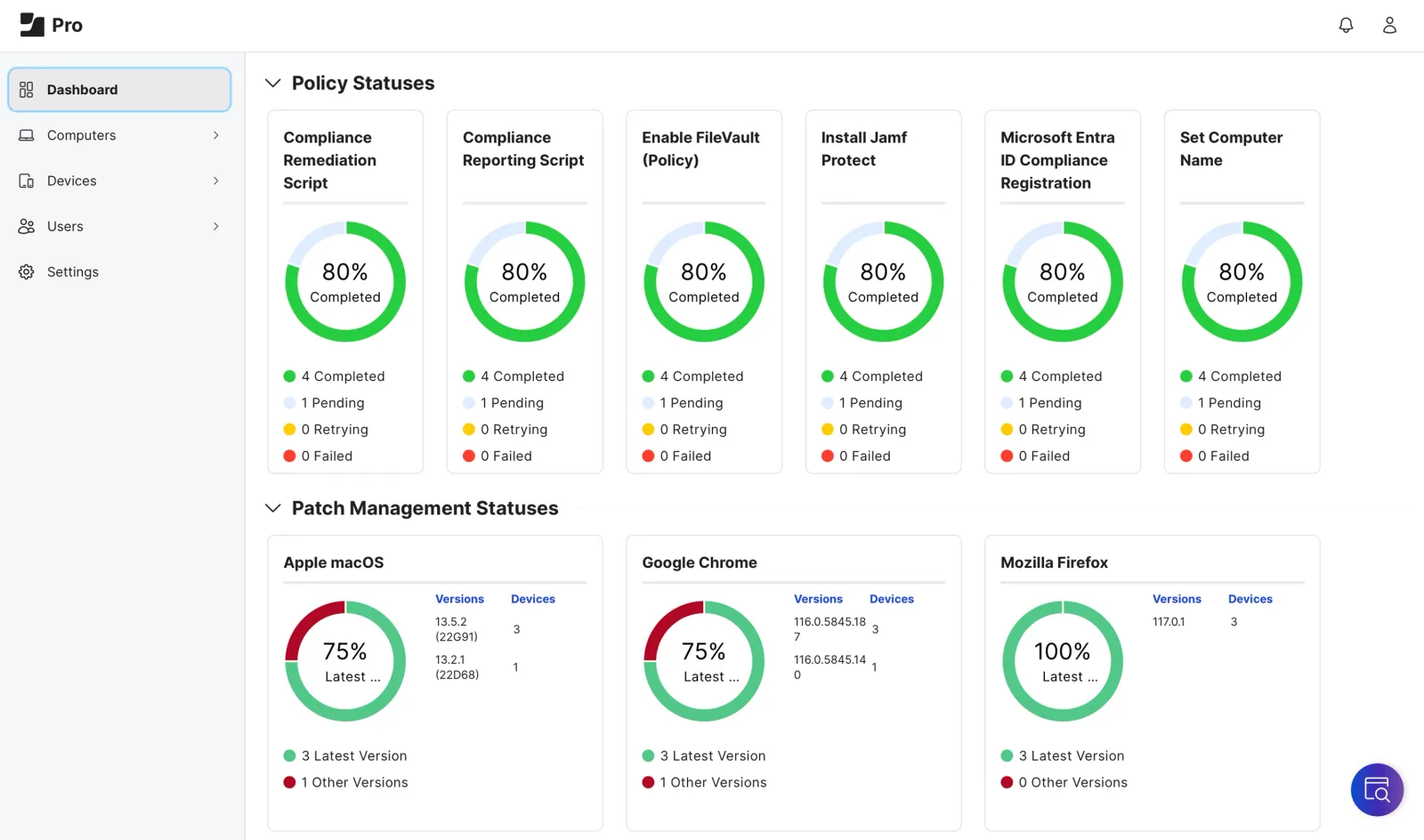
Jamf makes software updates easy with App Installers, which are a curated catalog of Mac-ready packages that sources and deploys the software for you.
You organize devices into Smart Groups that automatically shift as conditions change. From there, IT pushes configurations via Blueprints that run on Apple’s Declarative Device Management.
It also features Self Service+, which gives employees a locked-down app store to safely install approved tools and make basic fixes on their own.
Iru
Iru deals with configuration visually. You use Assignment Maps to stack apps and settings with simple logic, which lets you catch conflicts before they hit the device.
Iru’s Auto Apps catalog automatically patches common business tools in the background. It waits until the app is closed, giving users a heads-up before deadlines hit.
For the operating systems, Managed OS policies let IT set the timeline and automate Apple updates, so you can keep control without wrecking the user experience.
Microsoft Intune
Microsoft Intune brings Mobile Application Management (MAM) to the table.
Instead of locking down the entire piece of hardware, MAM just secures your company data inside specific apps. This is a win for bring-your-own-device setups that let employees access work files without handing IT the keys to their personal phones. For heavier app deployments, you can get the Enterprise Application Management tool through the Intune Suite.
Endpoint Security & Threat Response
Real cybersecurity is about having the tools for real-time tracking, stopping threats cold, and locking down exactly what your devices are allowed to do, all at the same time.
Jamf
Jamf tackles macOS and iOS security through Jamf Protect. It’s a next-gen antivirus that goes way past just scanning. Jamf Protect watches behavior directly on the hardware. This means it catches fileless attacks and “living-off-the-land” hacks instantly, without waiting for a cloud server to analyze them.
If something looks suspicious, Jamf enforces the quarantine mode right on the spot. It also looks out for all physical risks and keeps a tight grip on USB drives to stop data leaks. Plus, it flags devices running Apple OS versions with known CVEs so you know exactly where you’re exposed.
On mobile, it doesn’t miss, either. Jamf detects jailbreaks, sideloaded apps, and sketchy developer profiles. At the same time, Protect blocks bad web traffic like phishing, ransomware, and cryptojacking.
Iru
Iru tracks real-time processes, command lines, and network connections to stop new attacks before they can wreak havoc. IT gets surgical control to block or allow files based on exact hashes, paths, or publishers.
If a device gets seriously compromised, Iru automatically cuts it off from the network. But it leaves a secure backdoor open so IT can investigate and fix it.
Just like Jamf, it enforces encryption and heavily restricts removable media.
Microsoft Intune
Microsoft Intune builds its security wall differently. At its core, it focuses on protecting your data and holding onto device control. It enforces security policies and can remotely wipe a lost or stolen laptop in seconds.
Intune constantly checks device health in the background and feeds that data directly into Microsoft Entra Conditional Access. If a device falls out of compliance, it loses access to company files instantly.
For deep threat hunting, Intune relies on Microsoft Defender. But keep in mind, Defender is either packaged separately or locked behind higher-tier Microsoft 365 plans.
Zero-Touch Deployment, Zero IT Headaches Let Cloudfresh’s professional team handle your MDM implementation from A to Z. Get consulting, training, automated onboarding, and support specific to your very business so it can truly scale. Book a Call →

Auto-Compliance & Identity Access
Security doesn’t stop at malware. You have to prove that your mobile devices and the rest of the fleet meet strict standards, and that only the right people are logging in.
Jamf
When it comes to compliance, Jamf goes all-in on being proactive. It runs device checks against heavy-duty benchmarks like CIS all the time, so you spot gaps right away rather than wait for them to suddenly appear after an audit.
For identity, Jamf Connect wires local Mac accounts straight into your cloud identity provider. Passwords stay perfectly in sync, which translates to zero login friction for users.
It also supports Zero Trust Network Access (ZTNA) and lets IT hand out temporary admin rights. This keeps your team moving without permanently handing over the keys to the kingdom.
Iru
Iru is in favor of automation. With a single click, its security templates instantly apply dozens of settings to bring a Mac up to CIS Level 1 or Level 2.
The Vulnerability Management module calculates the exact blast radius to show how far an exploit could spread, then automatically deploys the fix through the Auto Apps system.
On the identity front, Iru is pushing passwordless logins. Its Workforce Identity module uses device-bound passkeys, real-time checks, and MFA to completely remove passwords from the workday.
Microsoft Intune
Microsoft Intune is hardwired into Microsoft Entra ID (the engine formerly known as Azure Active Directory). That deep integration gives you solid control over identities and access.
Intune enforces least-privilege rules and constantly double-checks users and devices before granting access to anything. This plugs perfectly into Microsoft’s Zero Trust model.
Apple MDM Pricing & Licensing
The price tag is where these platforms split, depending on how your company prefers to buy and scale.
Jamf
Jamf keeps things fully transparent with per-device pricing.
Jamf for Mac, which bundles Mobile Device Management, Jamf Connect, and Jamf Protect, runs $12.50 per macOS device per month with a 25-device minimum.
Jamf for Mobile sits at $5.75 per device per month under the same minimum.
Got a smaller team? Jamf Now starts at just $4 per device per month, built specifically for organizations under 25 users.
You also get a free 14-day trial so you can test the metal before signing a contract.
Iru
Iru doesn’t do flat pricing. You pay for what you build based on the modules you select—endpoint management, EDR, vulnerability management, identity, or compliance—and your total user and device count.
It requires an annual agreement, but they throw in free onboarding and migration support. A 14-day trial is available as well.
Microsoft Intune
Microsoft Intune charges by the user, not the hardware. Intune Plan 1 costs $8 per user per month, and each user can hook up multiple devices across different platforms.
If you are already deep in the Microsoft 365 ecosystem, Intune might not even cost you extra. It’s available directly with Microsoft 365 Business Premium ($18.79/user/month), E3 ($27.45/user/month), and E5 ($48.45/user/month), which makes it a cost-effective move for Microsoft-heavy shops.
Just watch out for the add-ons, though. Features like Endpoint Privilege Management and Remote Help require the Intune Suite, which tacks on an extra layer of cost.
How Do These MDM Solutions Compare?
| Feature Focus | Jamf | Iru (formerly Kandji) | Microsoft Intune |
| Operating System Support | Same-day support for all new Apple OS releases, covering macOS, iOS, iPadOS, tvOS, watchOS, and visionOS. | Supports macOS, iOS, iPadOS, and tvOS. | Supports macOS 13+ and iOS/iPadOS 16+. |
| Deployment & Onboarding | Zero-touch Automated Enrollment with a customized macOS onboarding screen. Includes a Return to Service app to instantly erase and refresh iOS/iPadOS devices. | Zero-touch deployment with a visual Mac onboarding experience. Includes a Migration Agent to automate mass transitions from legacy MDM solutions. | Automated provisioning and remote configuration without specialized Mac visual overlays. |
| Configuration Policies | Uses Blueprints powered by Apple’s modern Declarative Device Management, and Smart Groups for dynamic device targeting. | Uses Assignment Maps for visual, conflict-free configurations and allows custom script execution for edge cases. | Relies on AI-powered configuration baselines. |
| App & Patch Management | App Installers automate third-party Mac patching. Self Service+ app catalog. Can deploy App Store and custom, in-house signed apps. | Auto Apps catalog delivers zero-touch silent patching for business apps. Managed OS policies automate Apple updates. | Features Mobile Application Management (MAM) to secure corporate data within specific apps on personal mobile devices and laptops (BYOD). |
| Security & Threat Defense | Jamf Protect uses native Apple APIs to quarantine malware, block fileless attacks, detect iOS jailbreaks, and enforce removable storage controls. | Iru EDR provides real-time behavioral monitoring to catch novel attacks, controls removable media access, and can isolate compromised devices. | Remotely wipes devices. Evaluates endpoint health to enforce Microsoft Entra Conditional Access. |
| Compliance Auditing | Proactively hardens devices and audits against industry-standard IT compliance requirements, including CIS benchmarks. | Enforces CIS Level 1 or Level 2 security benchmarks instantly using one-click security templates. | Requires Microsoft Purview and Defender (higher tier) for advanced compliance controls. |
| Identity Management | Jamf Connect syncs local Mac passwords with cloud Identity Providers and manages temporary admin privilege elevation. | Workforce Identity aims to eliminate passwords using device-bound passkeys and live device posturing. | Natively uses Microsoft Entra ID to protect employee credentials and enforce least-privilege access. |
| Specialized Apple Workflows | Features the Healthcare Listener to automate bedside Apple device management based on patient records, and Jamf Mobile Assist for frontline workers. | Unified platform connects identity, endpoint, and compliance via the separate Iru Context Model. | Features Endpoint Privilege Management as a paid add-on to let standard users perform IT-approved tasks. |
Who’s Leading the MDM Solutions Market?
Jamf definitely looks good on paper. What’s much more important, though, is that it dominates both analyst reports and real-world user feedback. In January 2026, Gartner officially named Jamf a Leader in its Magic Quadrant for Endpoint Management Tools.
They pointed straight to its completeness of vision and ability to execute, which proves that Jamf actually delivers under real-world pressure.
That recognition validates exactly what Jamf is built to do as an Apple-first powerhouse that merges Mobile Device Management, security, and automation under one roof.
The people actually using the software agree. Over on G2, Jamf holds the top Leader spot in the MDM category, backed entirely by consistent reviews from IT teams running it in live production.
This also exposes a hard truth about the broader market. Most cross-platform tools are built with Windows at the center and treat Apple devices like a secondary afterthought.
FAQ
01 What’s a mobile device management (MDM) solution?
02 What platforms does MDM typically support?
03 What is BYOD, and how does MDM handle it?
04 Why do I need MDM in my organization?

Get in touch with Сloudfresh