

























The Best AI Tools for Business across Various Functions
- Miro: The Art of Observation
- Asana: Centralizing Work Management and Clarity
- Google: An All-in-One, AI-Powered Suite
- HubSpot: Scaling Efficiency
- Zendesk: Optimizing Customer Service Performance
- GitLab: Engineering Delivery, Measured and Sped Up
- Cloudflare: Secure, Location-Independent Connectivity
- Okta: Identity-Centric Security and Automation
- Jamf: Empowering the Apple End User
- JumpCloud: IT Management and Employee Lifecycle on the Same Page
- Frequently Asked Questions on How to Integrate Productivity Software for Maximum Benefits

24.12.2025 


The Best Business Productivity Tools for a Secure, AI-Ready Tech Stack
- Miro: The Art of Observation
- Asana: Centralizing Work Management and Clarity
- Google: An All-in-One, AI-Powered Suite
- HubSpot: Scaling Efficiency
- Zendesk: Optimizing Customer Service Performance
- GitLab: Engineering Delivery, Measured and Sped Up
- Cloudflare: Secure, Location-Independent Connectivity
- Okta: Identity-Centric Security and Automation
- Jamf: Empowering the Apple End User
- JumpCloud: IT Management and Employee Lifecycle on the Same Page
- Frequently Asked Questions on How to Integrate Productivity Software for Maximum Benefits
The way we think about productivity is changing. It’s no longer about how many tasks teams can push through. It’s about removing the everyday snags that slow people down.
Look at major enterprise platforms, such as Google Workspace, Asana, GitLab, HubSpot, Miro, Zendesk, Okta, Cloudflare, JumpCloud, and Jamf. They show a shared direction: helping people stay focused and in control of their work.
Digital friction is taking a real toll. Jumping between tasks, tools, and sources of information eats up far more time than most teams realize. Nonstop messages add to the strain. More than a third of workers say they feel weighed down by constant alerts.
The trend isn’t slowing, either. Forty-two percent say they spend more time on email than they did a year ago, and 40% say the same about video calls. With so much noise, distraction becomes routine. Over half of employees admit they multitask during virtual meetings.
In this article, we break down the three forces that are bringing change to how business productivity tools are used:
- The Cognitive Multiplier. Agentic AI is stepping into complex, context-heavy work to support knowledge workers and service teams and handle tasks that once demanded long hours and deep focus.
- Flow State Engineering. Companies are bringing platforms together to cut down on app switching and scattered data across DevOps, RevOps, and workplace systems.
- Security as an Accelerator. Zero Trust and unified endpoint management are replacing dated, slow-moving security models. Instead of dragging workers down, security becomes a fast, reliable on-ramp to the tools they need.
When you, as a leader, understand how these pieces fit together, you can move past one-off feature adoption and make decisions that lift both productivity and business performance.
Miro: The Art of Observation

Miro has become a space where teams think, plan, and track how well they’re doing. With it, you can spotlight the metrics that comprise product velocity, such as Time to Market (how fast does an idea become something real?) and Development Cycle Time (how quickly can team productivity tools help you build and adapt?).
With all the research, dashboards, and insights gathered in one shared workspace, Miro keeps these measures visible to everyone. That shared visibility helps your teams stay aligned and move with fewer surprises.
AI strengthens this workflow. Miro can spark new ideas, condense long discussions into clear takeaways, and turn scattered notes into organized documents. It lifts the repetitive tasks that usually slow collaboration, which gives you more space to focus on creative problem-solving.
The results are tangible. Companies using Miro often see planning cycles cut in half and a time to market that speeds up more than threefold.
Miro also acts as connective tissue across the business productivity tools teams rely on. Integrations with Google Drive, OneDrive, Slack, Microsoft Teams, and Jira let people bring content and tasks into the board without hopping between apps.
As a result, work stays centered in one place, which helps maintain focus and reduces the usual friction of checking files or updating tickets in separate systems.
Collaboration Should Be a Strategic Advantage Work with a Miro Solution Partner to shorten planning cycles, collapse decision latency, and keep every team operating from the same living blueprint. Speed up Alignment →
Asana: Centralizing Work Management and Clarity
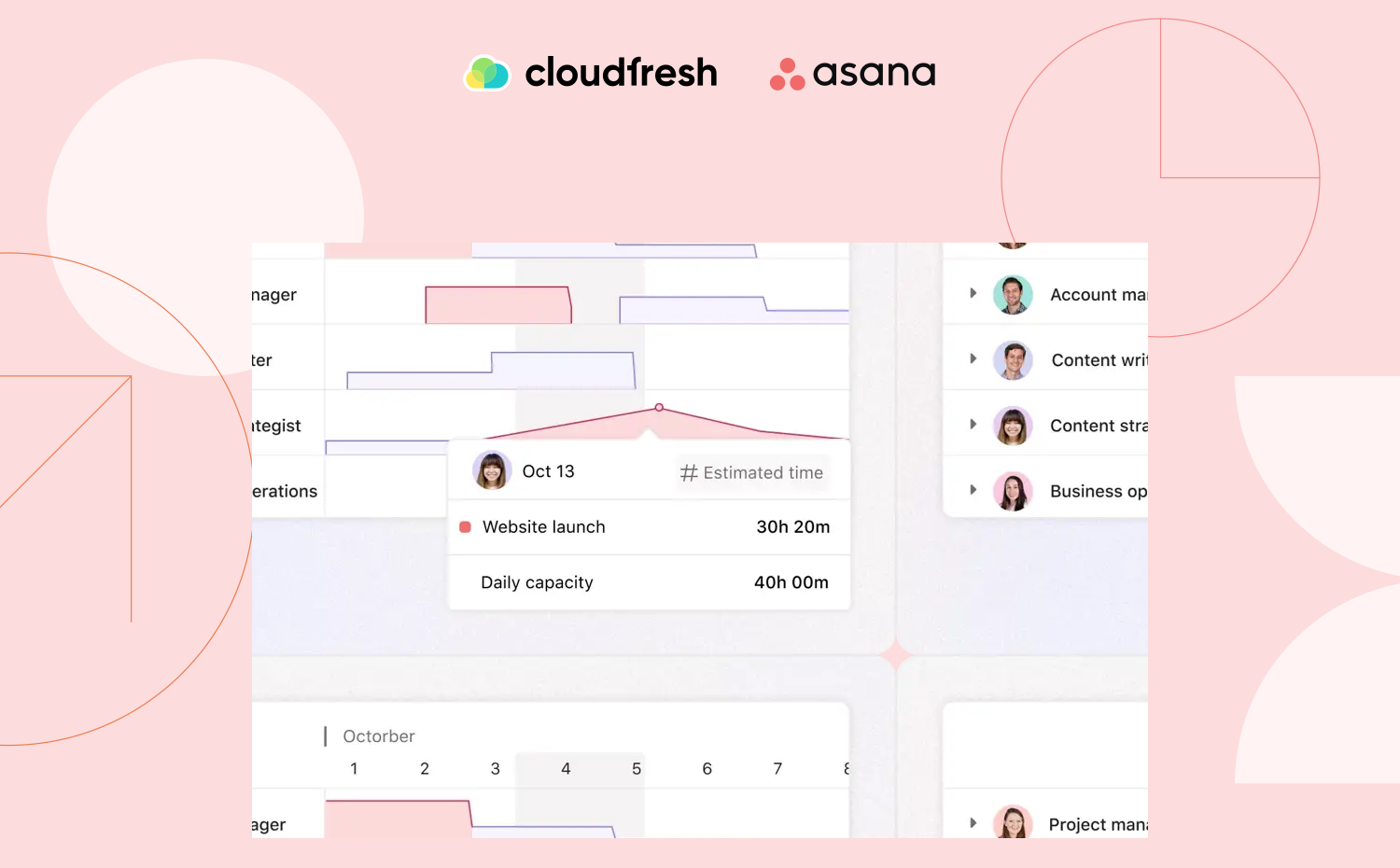
Asana is one of the team productivity tools designed to help you understand your work at a glance and spend less time on activities that steal attention. It clears away the usual hurdles like searching for documents, chasing approvals, or attending meetings that leave more questions than answers. The goal is to let people concentrate on work that produces real impact.
Asana relies on a dependable source of truth where projects, tasks, files, and feedback stay organized and visible. This makes coordination easier and helps teams understand how their contributions connect to broader goals.
Routine work flows more smoothly through automation. Requests route themselves, tasks move forward without manual hand-offs, and recurring projects can run on consistent templates.
Thanks to team productivity tools like Asana, you also gain flexibility in how you plan and track progress, whether through lists, boards, timelines, or calendars. And because Asana connects with the business productivity tools your employees use every day, they avoid the constant switching that drains time and breaks focus.
If Your Projects Aren’t Getting Faster, They’re Getting More Expensive Collaborate with an Asana Platinum Solutions Partner to rebuild execution around clarity, speed, and measurable workflow ROI. Rewire Execution →
Google: An All-in-One, AI-Powered Suite
Google Workspace brings AI into daily teamwork, with Gemini playing a central role. Together, they help your teams stay aligned, communicate clearly, and save time on the kinds of tasks that often pile up unnoticed.
In meetings, Gemini can translate captions in real time, generate transcripts, and pull together summaries with clear action items. MERGE says that this alone saves hours of follow-up work and helps teams deliver projects a third faster, and Hotmob’s marketing reports similar gains thanks to team productivity tools. When it comes to writing, Gemini can draft tailored emails, refine long documents, and support creative output like social content or pitch materials.
Gemini also helps employees get information faster. It can break down complex research, summarize lengthy email threads, and run data analysis directly in Sheets. Croud uses custom Gems as business productivity tools to handle sentiment analysis, advanced data tasks, coding assistance, and supplier-specific workflows, all of which allow employees to complete repeatable work at four to five times their previous pace.
As for Gemini Enterprise, companies use it to revamp workplace operations, cut decision-making times via improved data discovery, and equip employees with a research companion with access to all internal systems and documents as well as third-party apps. Besides, it is intended to act as a natural-language task assistant for developing strong customer insight and engage in high-impact sales interactions.
Outside Workspace, companies are tapping into Google’s broader AI ecosystem. Toyota, for example, built a platform on Google Cloud that lets factory workers create and deploy machine learning models themselves. This shift has eliminated over 10,000 hours of manual work each year and raised overall efficiency across their operations.
Scale Your Workplace with Ease Work with a Global Google Cloud Premier Partner specialized in Work Transformation and turn AI from “another initiative” into the multiplier behind every workflow you run. Make the Most of Team Productivity Tools →
HubSpot: Scaling Efficiency

Companies using HubSpot and its AI-powered Customer Platform often see striking gains: more leads, more deals closed, and faster ticket resolution within a year. At the center of the platform is Breeze, a layer of AI that powers a set of specialists known as Agents. These agents expand what your customer-facing teams can handle, often taking on work that once required large support or sales teams.
The Breeze Customer Agent focuses on service. It resolves questions around the clock, handles repetitive requests, and gives customers fast, tailored answers in multiple languages. Companies like Flipsnack cut their human-led conversations almost in half, and Youth on Course improved response times even as their ticket volume surged. As part of team productivity tools, this consistency allows you to support more customers without overwhelming human agents.
Sales teams rely on the Breeze Prospecting Agent to research prospects and write personalized outreach. Because it understands context, it produces messages that resonate and can even outperform some human representatives. SylvanSport saw a dramatic shift in their sales cycle, bringing the number of touchpoints needed to close a deal from 76 down to 13.
Content teams benefit from the Breeze Content Agent, which speeds up everything from brainstorming to finished deliverables. It can outline topics, turn a single presentation into a full content series, and generate production-ready material in a fraction of the time it would take manually.
Throughout the sales cycle, the Breeze Assistant keeps work moving by guiding representatives through the next best steps. Some teams using it have seen deal velocity rise by 20%.
Together, these business productivity tools form the core of HubSpot’s strategy, which is an AI-driven system built on top of SmartCRM, a number of dedicated Hubs, and unified data. This focus on autonomy and AI is driving massive ecosystem growth, projected to nearly triple from US$13.7 billion in 2025 to US$36 billion by 2029, with AI-powered solutions accounting for over 40% of this growth.
The platform’s ability to absorb routine inquiries and automate prospecting gives organizations a way to scale support and sales without increasing headcount at the same pace, a shift that turns customer engagement into something far more autonomous and efficient.
Revenue Doesn’t Stall. Systems Do A HubSpot Diamond Partner can help you eliminate the operational sprawl hiding inside your funnel and turn Revenue Operations into a predictable growth machine. Reboot Your RevOps →

Zendesk: Optimizing Customer Service Performance
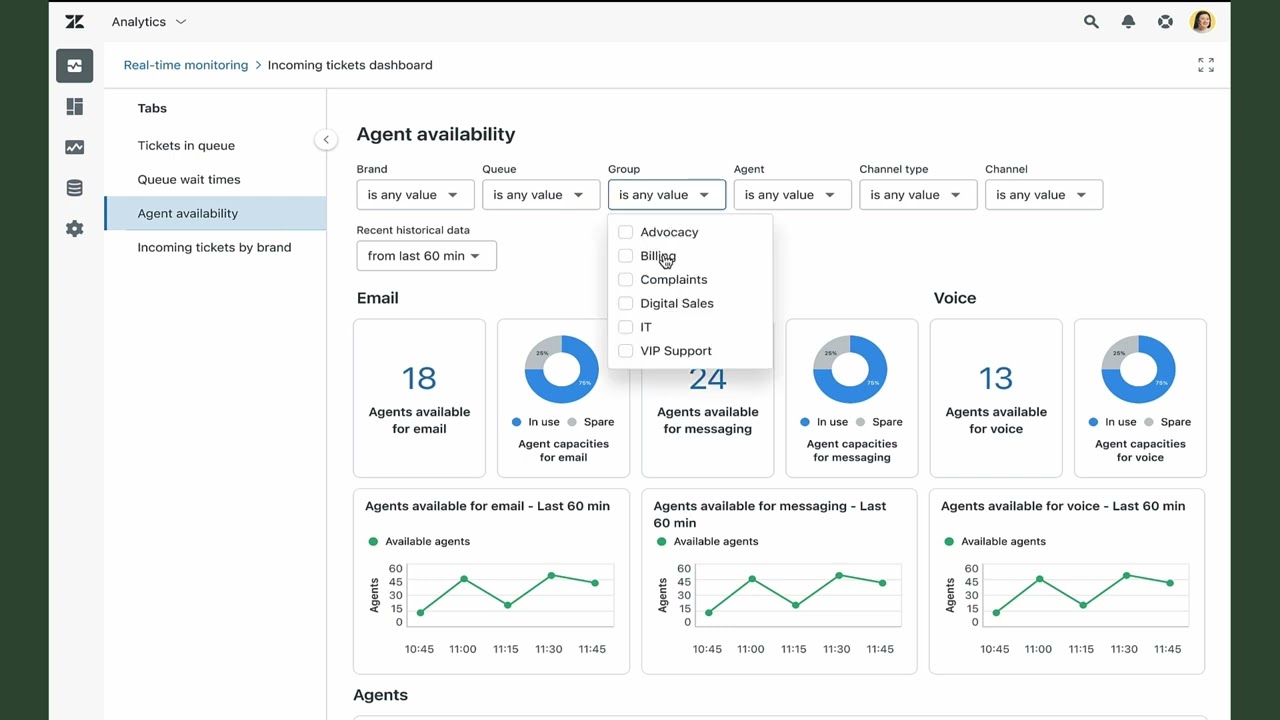
Zendesk focuses on helping support teams work quickly, stay organized, and deliver strong customer experiences. Its tools structure incoming tickets into clear groups, making it easy for agents to identify what needs attention first. Skills-based routing and omnichannel assignment make sure that the right agent gets the right ticket at the right moment, based on expertise and availability.
Agents can speed up routine work with Macros, which handle repetitive actions with a single selection. This keeps responses accurate and consistent across the team. Each ticket also includes a customer context panel with essential details and recent activity, letting agents personalize their responses without digging through past conversations.
Collaboration is built into the workflow. Side conversations allow agents to reach out to internal teams or third-party partners directly from the ticket. They can involve colleagues through followers or simple mentions, keeping communication transparent and contained within the support environment.
Leaders can track performance through the Agent Productivity Dashboard, which highlights responsiveness, efficiency, and availability across channels. It includes key measures like first reply time, average handle time, and customer satisfaction, giving supervisors a clear picture of how their teams are performing.
Zendesk also shows how agents spend their time—whether online, offline, away, or in limited-capacity states—so managers can understand workload patterns and make informed staffing decisions.
Through the mix of workflow-focused business productivity tools, collaboration features, analytics, and AI ticketing, team productivity tools like Zendesk help support reps operate with clarity and speed while keeping customer satisfaction high.
Your Support Is Sitting on Untapped Efficiency With a Zendesk Advanced Partner, cut resolution friction, collapse ticket loops, and turn your support desk into a real-time intelligence engine. Unlock It →
GitLab: Engineering Delivery, Measured and Sped Up

GitLab’s entire DevSecOps platform is about improving how developers work. Its approach blends workflow optimization, automation, and continuous measurement, with the Merge Request Rate serving as the key indicator of productivity.
Tracking this indicator along with DORA metrics encourages engineers to break work into small, reviewable steps, which speeds up collaboration and gets features into users’ hands more quickly. To keep quality intact, GitLab follows additional measures such as review-to-merge time, iteration health, and work type distribution, all of which give teams a balanced view of their output.
Iteration sits at the core of GitLab’s strategy. Smaller changes move faster, reduce review load, and help teams maintain momentum. GitLab strengthens this philosophy via contextual panels that reduce excess navigation and help developers stay close to the code.
AI agents, including the GitLab Security Analyst Agent and the GitLab Duo Planner Agent, come built into the platform. They assist with vulnerability management, security analysis, and breaking down complex work into actionable steps.
GitLab also boosts CI/CD performance. Dynamic job dependencies make pipelines faster and more scalable, while improved artifact handling supports larger workloads without slowing teams down. Governance is easier, too, thanks to inherited group memberships for Code Owners and clear indicators when system-driven approval resets occur.
All of this supports GitLab’s central aim: keeping developers in one environment where planning, coding, testing, security, and monitoring share a single data store.
The biggest drag on development speed has always been the mental cost of switching between specialized tools. With every stage of DevSecOps in one place, GitLab removes that burden and shortens cycle time in a way that isolated business productivity tools simply can’t match.
Slow Dev Cycles Are Not a Talent Issue. They’re a Toolchain Issue Partner with a GitLab Select & Professional Services Partner to reduce development cycle time, unify your DevSecOps toolchain, and ship faster with less friction. Upgrade Your DevSecOps →

Cloudflare: Secure, Location-Independent Connectivity

Security leaders are rapidly shifting toward Zero Trust Network Access, with nearly all of them prioritizing a ZTNA strategy. The push is clear: older security setups create friction. Almost half of organizations have dealt with latency issues as remote workers leaned more heavily on traditional VPNs.
Cloudflare built Cloudflare Access to replace those VPNs. The goal was to eliminate the slow, unreliable experience that often clogged helpdesks and frustrated users. Instead of dealing with separate logins and connection drops, employees authenticate once through their identity provider and move straight into the internal apps they need, whether that’s Jira, Confluence, or anything else secured behind Access.
And that’s definitely something that legacy business productivity tools couldn’t keep up with.
A Forrester study found that organizations using Cloudflare’s connectivity cloud became more efficient on both security and IT fronts. Security teams saw a sizable efficiency lift of 29%, and IT team productivity tools led to meaningful gains as well (13%), all contributing to a strong return on investment and a lower risk of breaches.
New employees also benefit from a smoother start. The Access App Launch gives each person a simple dashboard with every authorized app laid out clearly, turning what used to be a slowdown in the onboarding process into a quick entry point.
Administrators gain better visibility, too. Cloudflare Access logs every request and authentication event, which helps teams close blind spots and maintain reliable audit trails.
Engineering teams get a boost as well, connecting securely to repositories and data centers over SSH without dealing with a VPN’s usual hurdles.
The result is a more secure environment that feels lighter and faster for everyone.
VPNs Don’t Just Slow Connections. They Slow Companies As a Cloudflare Select Partner, we help you deploy Zero Trust access that protects your workforce without ever breaking its flow. Adopt ZTNA →

Okta: Identity-Centric Security and Automation

Okta centers the entire security story around identity. It protects employees, partners, customers, and even AI agents under one system that’s designed to keep people moving while improving your organization’s security.
A major part of that experience is the way Okta handles access. Employees sign in once at the device level through Okta Device Access and can then open all of their apps without struggling with credentials or waiting for helpdesk resets. This single-login flow removes one of the biggest sources of user frustration and frees IT teams from a constant stream of password-related issues.
Okta Identity Governance expands on this by giving users a self-service portal where they can request access without long email threads. Approvals route automatically, and every step is logged. That same automation runs through the core identity lifecycle—onboarding, transfers, and offboarding—reducing manual work so team productivity tools can help IT put their time into more strategic efforts.
One conservative estimate found that automating critical IAM tasks, such as new account creation, processing leaves of absence, and security training tracking, saved tasks equivalent to nearly two person-years of IT labor over a single year.
Security becomes more efficient through Okta’s Zero Trust foundation. Every access request undergoes phishing-resistant verification, and Adaptive MFA evaluates risk based on context.
When everything looks normal, authentication happens quietly in the background with specific business productivity tools like Okta FastPass. When something appears suspicious, stronger checks activate immediately.
In the meantime, Identity Threat Protection ties into other security systems to respond to risks in real time, helping organizations stay ahead of identity-based attacks without slowing down everyday work.
Identity Is the New Perimeter. Own It With an Okta Activate Partner, unify identity across people, devices, and agents to remove nearly all of the invisible friction slowing your organization down. Modernize Access at the Core →
Jamf: Empowering the Apple End User

Unified Endpoint Management has become essential for managing devices across an organization, especially as unmanaged endpoints introduce avoidable risk and inefficiency. Jamf focuses on delivering a clean, consistent experience for teams using Apple devices, helping your organization support a workforce that expects reliability and ease of use from the tools it relies on.
Self Service+ sits at the center of this experience. It brings the classic Self Service app and Jamf Protect features into one place on macOS, giving users a straight path to becoming productive and security-aware. The interface is customizable and allows you to add branding and internal communications. Jamf’s long-term aim is to create this same experience across macOS, iOS, iPadOS, Windows, and Android, a shift that’s particularly valuable for companies managing mixed fleets.
With business productivity tools that are easier for employees to adopt, Jamf reduces the load on IT teams. Admins often support hundreds of users, so improvements in user experience directly translate into fewer support tickets and smoother daily operations.
Jamf’s focus on trust and consistency helps your organization build an endpoint environment that works for users rather than against them.
The Apple Experience Should Take Almost No Effort As a certified Jamf Professional Partner, we make sure that onboarding, security, and device management feel as frictionless as the hardware your teams love. Deliver the Apple Standard →

JumpCloud: IT Management and Employee Lifecycle on the Same Page

JumpCloud brings identity, access, and device management together under one roof. This unified directory approach benefits both IT teams and end users, especially in organizations that would otherwise have to use multiple point solutions.
Managing separate systems for different operating systems, locations, and user groups adds unnecessary cost and complexity; JumpCloud cuts through that by centralizing everything.
Automation drives much of the platform’s value. Team productivity tools like User Groups, Device Groups, and Policy Groups allow IT to provision access, enforce policies, and manage devices at scale throughout the entire employee lifecycle.
Tasks that used to require manual intervention, like onboarding new hires or adjusting permissions when someone moves to a new role, happen quickly and consistently.
Password management has historically been one of the largest drains on IT resources, often representing half of all service desk calls. JumpCloud automates password resets (which can sometimes cost US$70 and more per user), enforces rotation policies, and provides a built-in Password Manager, cutting down on both time and cost.
The platform also includes features like SSO, MFA, Conditional Access, and Patch Management, reducing the need for separate tools and the integration challenges that come with them.
End users benefit from the simplicity of a single identity. New hires can access the business productivity tools they need immediately, and employees who change roles don’t lose momentum waiting for permissions to update. Since many workers switch between 10 or more apps every hour, reducing credentials has a noticeable impact on daily productivity.
JumpCloud’s strategy is especially suited for small and midsize enterprises, where stacking specialized tools often increases cognitive load instead of reducing it. Having identity, access, and device workflows consolidated, JumpCloud lightens the administrative burden and creates a clearer operational picture.
Its automatic provisioning and deprovisioning through SCIM, including integration with Cloudflare, helps organizations maintain accuracy and avoid the security risks that come with manual account management.
IT Complexity Is Taxation You Must Evade Reach out to a JumpCloud Platinum Partner to consolidate identity, access, and device management into one unified control plane without the enterprise overhead. Unify Your IT Stack →
Frequently Asked Questions on How to Integrate Productivity Software for Maximum Benefits
A frictionless productivity stack doesn’t materialize from new features or isolated upgrades. It emerges when companies make deliberate choices about how their systems talk to one another, how workers move through their day, and how AI fits into the broader operational picture. Several principles stand out as essential.
What is a business productivity tool?
A business productivity tool is something that helps firms commit to defining and measuring flow state. These tools only deliver value when teams can show that work is actually moving faster. Collaboration platforms such as Asana and Miro should be evaluated by the reduction in project lead times or the return on specific workflows, not by how many people log in. In engineering, the north star is compressing the development cycle, a core focus of GitLab. In IT, the signals come from faster device provisioning and the steady decline of support tickets as self-service becomes the norm. The task is to identify the friction each tool aims to remove and then prove that it’s working.
Do business productivity tools require IT support?
They require a proper approach to identity and access, which is typically an IT function. Security no longer has to feel like a speed bump. If you treat identity as the perimeter and welcome Zero Trust, your organization can create a faster, more reliable access layer. Platforms like Okta and JumpCloud provide the identity backbone, while Cloudflare’s ZTNA replaces slow, maintenance-heavy VPNs. The choice between specialized tools like Jamf for Apple-heavy environments (and its 80% provisioning time reduction) or broader platforms like JumpCloud ultimately depends on the devices and the resources your IT team has available.
Can productivity tools help with remote work?
Yes, they are central to remote and hybrid work, but their full impact relies on the investment in the workforce that will partner with AI. Tools are advancing quickly, but the real impact comes from people who know how to guide, question, and refine what AI produces. Preparing employees for roles that require stronger prompt design, sharper judgment, and more sophisticated oversight will help you make sure that human and machine contributions meet at a balanced split. Without that preparation, even the most advanced business productivity tools will fall short of their potential.
How to integrate business productivity tools with existing systems?
The first step to successful integration is consolidation. AI can only be as effective as the data and workflows it relies on. When information is all over your systems or trapped in manual processes, even the most capable autonomous agents lose their edge. Before investing heavily in AI, you need to bring your data together, eliminate silos, and smooth out the pathways that information travels. Without this groundwork, AI becomes an underpowered add-on rather than a true multiplier.
Together, these principles create an environment where productivity adds up. Systems integrate cleanly, workers stay in flow, and AI becomes a genuine force multiplier rather than another source of complexity.
If you’re ready to adopt these principles and some of the best team productivity tools out there today, you’re more than welcome to fill out the short form below.

Get in touch with Сloudfresh