

























DevSecOps: Integrating product security at every stage of the SDLC
- The Core Architecture: Two Ways to Work
- The Interactive Layer: GitLab Duo Agentic Chat
- The CI/CD Automation Layer: Orchestrating Flows
- The Central Hub: The AI Catalog and Automate Dashboard
- Going Silosless: The Model Context Protocol (MCP)
- Deep Customization: Shaping the Platform to Fit Your Team
- Why This Matters Now: The Business Case
- FAQ
GitLab 09.02.2026 


What Is GitLab Duo Agent Platform, or Why Do You Need to Make the SDLC Switch?
- The Core Architecture: Two Ways to Work
- The Interactive Layer: GitLab Duo Agentic Chat
- The CI/CD Automation Layer: Orchestrating Flows
- The Central Hub: The AI Catalog and Automate Dashboard
- Going Silosless: The Model Context Protocol (MCP)
- Deep Customization: Shaping the Platform to Fit Your Team
- Why This Matters Now: The Business Case
- FAQ
For the past couple of years, AI in software development meant one thing: code completion. It was useful, but limited. The tool watched what you typed and guessed what came next. Helpful, yes. But it stayed on the sidelines.
The GitLab Duo Agent Platform changes that. It moves AI from passive help to active participation. This is Agentic AI, where autonomous agents can think through problems, plan next steps, and carry out real work across the entire Software Development Life Cycle.
They don’t just answer questions. They pitch in. An agent can sort through security issues, clean up old code, or handle a multi-step deployment on its own. It works in the background and keeps things moving thanks to CI/CD automation.
As a Select- and Professional Services-tier GitLab Partner, here’s everything we think you must know about GitLab Duo Agent Platform.
Tired of AI Tools That Lack Context? Our certified experts will walk your team through a personalized demo designed to cover your specific DevSecOps needs. Book Now →

The Core Architecture: Two Ways to Work
To get the most out of the platform, it helps to understand its two modes: Agents and Flows. They share the same AI foundation but play very different roles in daily development.
Agents are built for live collaboration. You talk to them directly in the GitLab Duo Agentic Chat. The exchange is immediate and interactive. This works well when you’re debugging an error, sketching out a system design, or trying to understand a tricky piece of code.
Flows are all about execution. A GitLab Duo Workflow is a set of steps that runs on GitLab’s own compute, without needing constant input. It doesn’t wait for chat messages. It reacts to events.
A flow might start when someone uses a certain keyword in a merge request. Or when a reviewer gets assigned to an issue. Once it kicks off, it gets to work. It can review requirements, update several files, run tests, and even open a merge request. All of that happens without anyone hovering over it.
Together, Agents and Flows turn AI into a true teammate—one you can talk to when you need help, and one that can run with the work when you don’t.
The Interactive Layer: GitLab Duo Agentic Chat
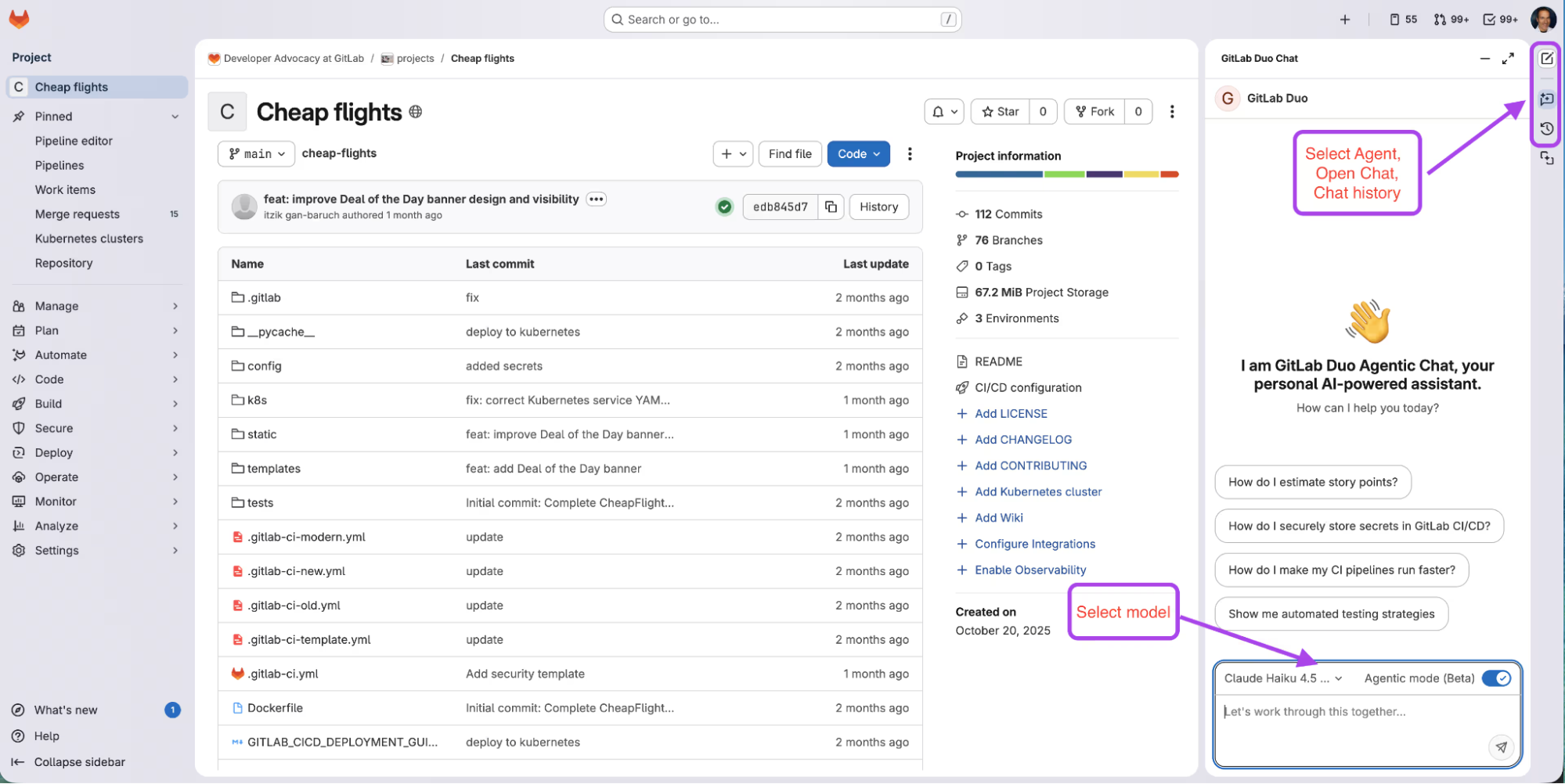
GitLab Duo Agentic Chat is where most work with the platform begins. It lives as an always-on panel in the GitLab web interface and inside popular IDEs like VS Code, JetBrains, and Visual Studio. This isn’t a simple chat window. It keeps track of past conversations and understands the structure of the project you’re working on.
Because it knows the context, the chat acts more like a control hub than a prompt box. You can pick up where you left off, reference existing code, and dive straight into real problems without restating everything.
One of the most useful features here is model selection. Different language models are better at different jobs, and GitLab lets you switch between them. You might choose a model that’s strong at reasoning when planning an architecture. Then you switch to a faster model when writing or reviewing lots of code.
Teams can decide how this works. Admins can lock in a model at the group level, or they can let each developer choose what fits their workflow.
Inside the chat, you work with Foundational Agents. These are built-in AI roles, maintained by GitLab, each focused on a specific part of the development process.
- GitLab Duo (default) is the all-purpose coding partner. It explains code, helps debug issues, and supports refactoring.
- Planner Agent revolves around product planning. It can break down large epics into clear user stories and tasks. You might ask it to split an epic into smaller items and estimate their complexity.
- Security Analyst Agent focuses on vulnerabilities. It helps teams sort real risks from noise, rank issues by impact, and even open merge requests to fix specific problems.
- Data Analyst Agent makes platform data easier to access. You can ask plain-language questions, like how many merge requests were opened last quarter, and it turns them into accurate GitLab Query Language requests.
The CI/CD Automation Layer: Orchestrating Flows
Agents handle discussion. Flows handle execution—or, in other words, multi-agent orchestration.
The platform supports two kinds of GitLab Duo Workflows: Foundational Flows and Custom Flows.
Foundational Flows are ready to be used with CI/CD automation right away. One example is the Fix CI/CD Pipeline flow. When a job fails, a developer can trigger it right from the logs. The flow reviews the failure, finds the cause, and suggests a fix.
Another example is Convert Jenkins to GitLab CI/CD. This flow takes an existing Jenkinsfile and turns it into a GitLab pipeline. What used to be a careful, manual migration becomes a single click.
Custom Flows go a step further. Teams can define their own GitLab Duo Workflows using YAML files. This makes it possible to design multi-step processes that match how your team actually works.
A custom flow is built from three pieces.
- Components define the autonomous agents or steps involved.
- Routers decide what happens next.
- Prompts guide each agent’s behavior.
Say, your team sets up a Compliance Flow. It starts automatically when a merge request is opened. First, the code goes to a Security Agent to check for sensitive data. If that passes, the flow sends the changes to a Documentation Agent to confirm that README has synced any API updates.
At the end, a Summary Agent gathers the results and posts a report directly on the merge request. No one has to manage the process. The flow runs in the background, exactly as defined in your team’s YAML configuration.
The Central Hub: The AI Catalog and Automate Dashboard
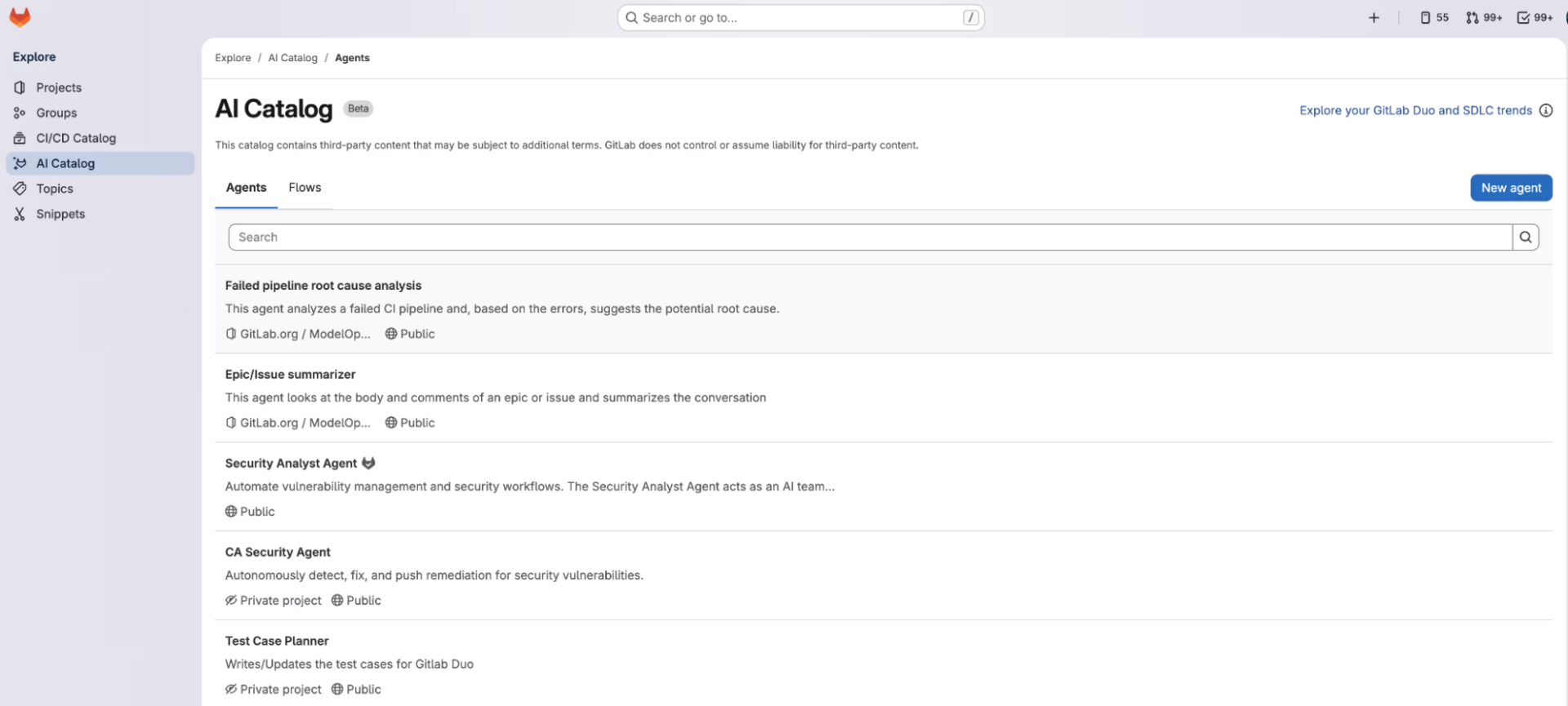
As teams create more autonomous agents and flows, you should focus on keeping things organized within this multi-agent orchestration. That’s where the AI Catalog comes in. It’s the shared home for everything your team builds, like an internal library where developers can find, create, and reuse AI tools.
The catalog is designed with collaboration in mind. When someone builds a new agent, they choose who can see it. A Private agent stays limited to the project, which makes it perfect for testing and early experiments. Once it’s ready, the agent can go live as Public, which would make it available across the organization.
This approach encourages reuse. Instead of multiple teams building their own version of the same code review agent, they can share one trusted solution.
Reliability is protected through semantic versioning. Every time an agent or flow is updated, GitLab assigns it a new version number, like moving from 1.0.0 to 1.1.0. Each version is locked in place. If a project uses version 1.0.0, it will keep using it—even if version 2.0.0 is released later.
Nothing changes unless a maintainer chooses to upgrade. This keeps production workflows stable and avoids surprise behavior shifts.
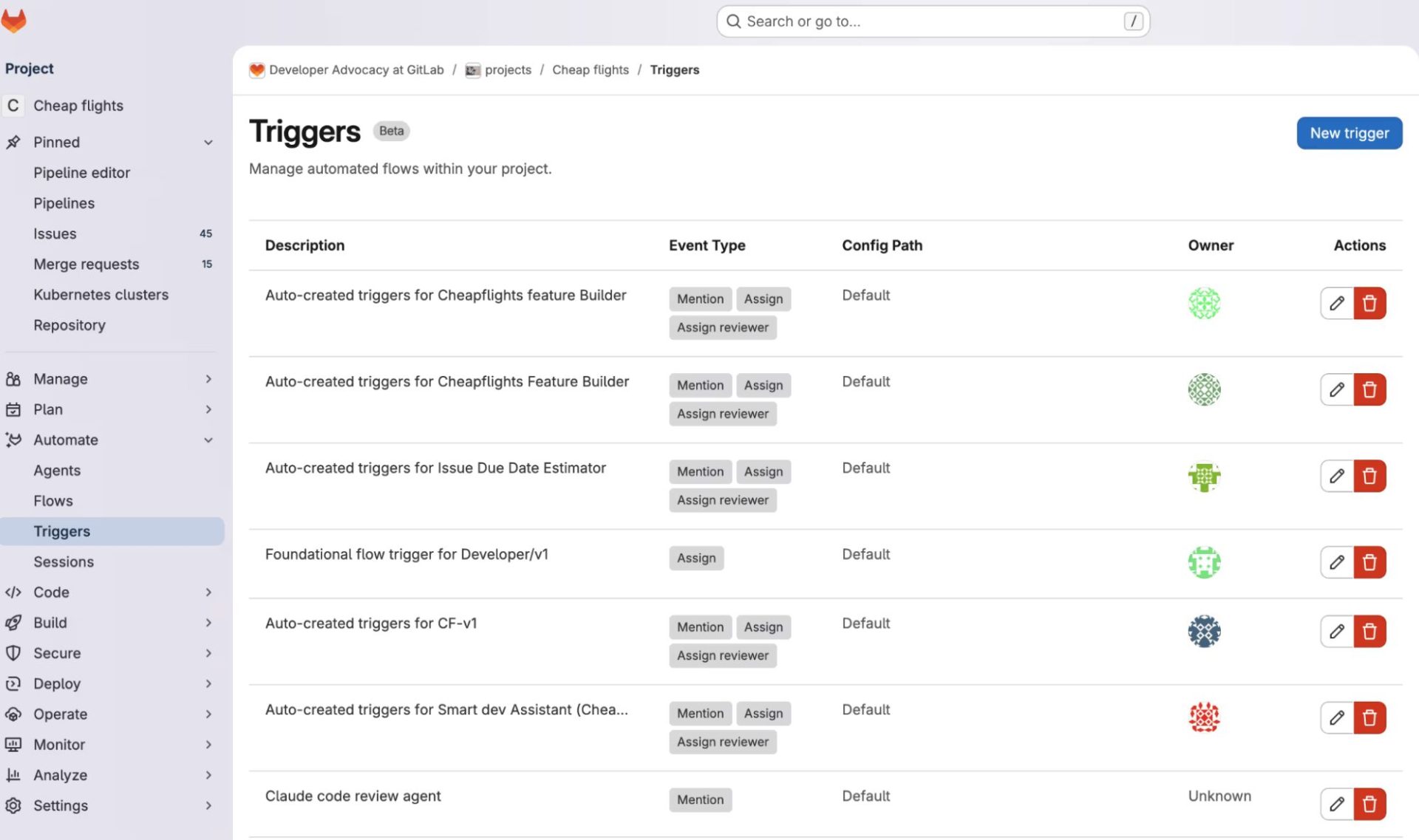
Along with the catalog, there’s the Automate dashboard. This is the control room for everything that runs. It’s organized into four sections: Agents, Flows, Triggers, and Sessions.
Triggers are especially powerful. They let teams connect events to actions. A GitLab Duo Workflow can start when someone mentions a bot in a comment, like @refactor-bot. It can also run when an agent is assigned to an issue or a merge request, or when it’s added as a reviewer. Once the trigger fires, the rest happens automatically.
For auditing and troubleshooting, the Sessions view offers full visibility. Every agent interaction and every flow run creates a detailed log. You can see the final result, the reasoning steps along the way, the tools the AI used, and the raw output from execution.
This level of insight makes it easier to trust what the AI is doing and to improve it over time.
Going Silosless: The Model Context Protocol (MCP)
Traditional AI tools often work in isolation. They can only see what’s right in front of them. The GitLab Duo Agent Platform removes that limitation with the Model Context Protocol, or MCP.
In a nutshell, MCP is an open-standard enabler for AI models to connect to external systems in a secure way. GitLab supports it in both directions, acting as a client and as a server.
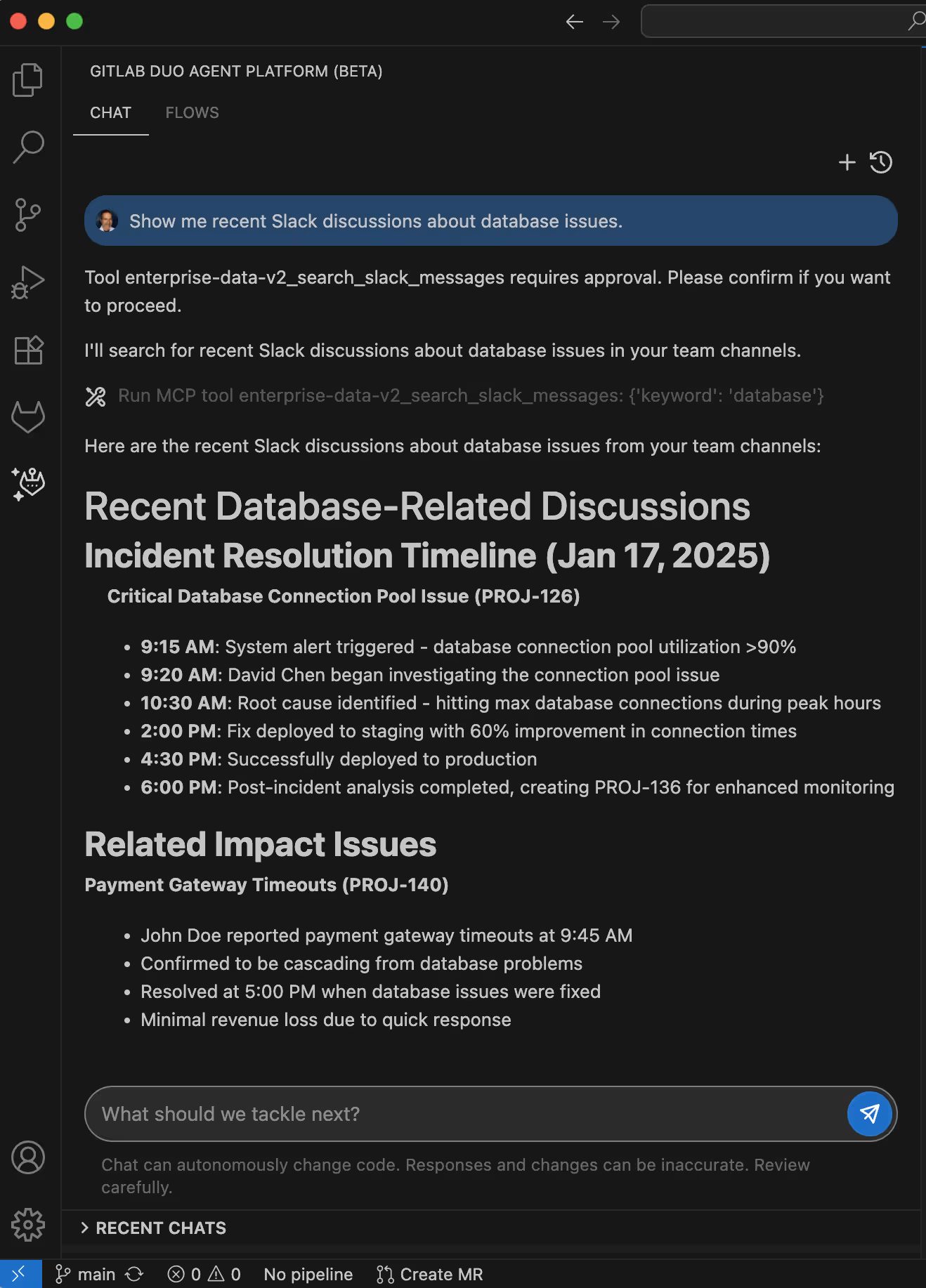
When GitLab acts as an MCP client, Duo agents can reach beyond the repository. Teams can connect MCP servers to environments like Jira, Slack, or Google Cloud Platform and therefore expand their multi-agent orchestration even further.
Picture a payment outage on a Monday morning. A developer asks GitLab Duo to investigate. The agent pulls recent tickets from Jira, scans Slack for engineering discussions, and checks monitoring tools for error spikes.
The result is a single, connected view of what’s going on, built from multiple sources into a single CI/CD automation system.
When GitLab acts as an MCP server, the GitLab Duo Workflow goes the other way. External AI tools can access GitLab data directly. If a developer prefers an AI-first editor like Cursor or Claude Desktop, they can connect it to the GitLab MCP server.
With permission in place, those tools can read issues, review merge request diffs, and check pipeline status. Developers get full access to their SDLC context, no matter which editor or assistant they choose.
In the end, MCP makes sure the AI works where developers work—and with all the context they need.
Deep Customization: Shaping the Platform to Fit Your Team
What really sets the platform apart is how far it can be customized. GitLab designed it with flexibility in mind, so AI behavior can reflect how your organization actually works.
At the foundation are system prompts. These define how a custom agent thinks, responds, and behaves. A prompt is essentially the agent’s mindset. For example, a troubleshooting agent might be instructed to always ask for reproduction steps, focus on logs first, and keep responses technical.
These prompts become the core guidance for any custom agent created in the AI Catalog.
For broader consistency, the platform supports chat-rules.md. This file can live at the user level or the workspace level. It sets shared preferences and boundaries, such as using TypeScript in examples, favoring functional patterns, or keeping replies brief.
This helps the AI match the tone, style, and expectations of a specific team—or even an individual developer.
Standardization goes further with AGENTS.md. This file follows an industry-wide format and makes sure that all autonomous agents and flows that touch a repository (third-party tools included) live by the rules. It covers everything from architectural guidelines to security requirements, like never suggesting hardcoded secrets.
Because AGENTS.md is based on an open standard, any compatible AI tool can follow the same instructions. That means consistent behavior, no matter which assistant is in use.
For teams that want precise control over automated reviews, there’s mr-review-instructions.yaml. This file fine-tunes how the Code Review Foundational Flow behaves. Using glob patterns, teams can apply different checks to different file types.
Ruby files might trigger checks for RSpec coverage. Vue components might prompt accessibility checks. Each review stays focused on the code that actually changed.
Why This Matters Now: The Business Case
Moving from basic AI assistants to multi-agent orchestration creates some real advantages.
- From typing faster to shipping faster. Traditional assistants wait for input. Duo Agents don’t. A developer can kick off a GitLab Duo Workflow to refactor legacy code or generate a compliance report, then move on to other work. The AI runs in parallel, handling tasks in the background and freeing up human attention.
- Breaking knowledge silos with MCP. In large organizations, all the important information lives across tools like Jira and Slack, platforms like GCP, and monitoring systems. Developers spend hours switching alone. With MCP, an agent can link an error log to a related ticket and a team chat in an instant, all within the same IDE.
- Built-in governance and compliance. It’s challenging to scale manually. Files like
AGENTS.mdandchat-rules.mddirectly tell the AI what the standards are. Instead of relying on reviewers to catch issues, autonomous agents follow your architectural and security rules by default. Every generated change reflects the same expectations, regardless of who initiated it. - Reducing toil and technical debt. Senior engineers often spend time on repetitive, low-impact work. Migrating pipelines. Sorting through noisy security findings. Foundational Flows automate these tasks. That gives teams more space to focus on features, improvements, and long-term value.
If you’d like to explore what this could look like for your company in cooperation with Cloudfresh—a professionally certified GitLab implementation services provider—feel free to fill out the short form below.
FAQ
01 What is GitLab Duo Agent Platform?
02 Which plans support GitLab Duo Agent Platform?
03 What does GitLab Duo Agent Platform’s pricing model look like?
04 Can GitLab Duo Agent Platform talk to external tooling?

Get in touch with Сloudfresh